

Copy only visible cells
This extension provides an alternative to the 'Select Visible Cells' command in Microsoft Excel. It´s useful to use with subtotals or ranges with hidden columns or rows.
latest release: 2024-03-21 15:08:57
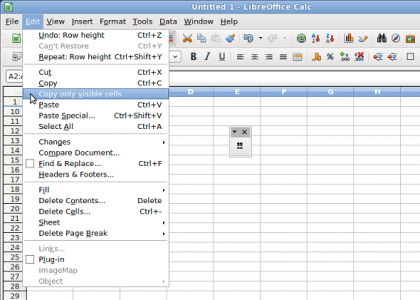
Description
To use Copy only visible cells, do the following steps:
1. install the extension;
2. restart LibreOffice;
3. open your sheet with hidden rows or columns;
4. select a range;
5. insted the simple copy button, click on Copy only visible cells button (or Edit -> Copy only visible cells menu);
6. paste in your target document, for example, another sheet or a RTF text table.
The hidden rows or columns won´t paste.
Note: it´s not possible paste especial with 'DDE Link' option in Writer.
Available on 16 languages: Bulgarian, Catalan, Danish, Dutch, English (default language), Estonian, French, German, Hungarian, Italian, Lithuanian, Portuguese (Brazil), Portuguese (Portugal), Slovenian, Spanish and Swedish. Special thanks: Andrew Pitonyak, Stephan Wunderlich, Ryan Nelson, Sheila Tozatti, Paolo Mantovani, Christian Junker and Comune di Bologna.
Homepage: http://wiki.documentfoundation.org/PT-BR/Extensions/Projects/CopyVisiCells/en
| Release | Description | Compatibility | Operating Systems | License | Release notes | Updated | |
|---|---|---|---|---|---|---|---|
| 2.0 | The code was completely refactored for LibreOffice 5.2.x. | 5.2 | Linux, Windows, macOS | LGPL | 2020-03-05 22:50:34 | Download | |
| 1.1 | Big ranges copy bug fixed. | 4.1 | LGPL | 2020-03-05 22:50:34 | Download | ||
| 1.0.5 | New Catalan and Dutch translations. | 3.3 | LGPL | 2020-03-05 22:50:34 | Download | ||
| 1.2 | Added 5.0 and 5.1 compatibility. Important: this version is not 5.2 compatible. | 5.0 | Linux, Windows, macOS | LGPL | 2020-03-05 22:50:34 | Download |
★ ★ ★ ☆ ☆
Post your review
You cannot post reviews until you have logged in. Login Here.
Reviews
John Leonard Oct 13, 2023, 11:35 PM (16 months ago)
★ ★ ★ ☆ ☆
sometimes it works but sometimes it does this with subtotals
Item 1 Sum -7058.84
Item 2 Sum #REF!
Item 3 Sum #REF!
Grand Sum -7058.84
Timur Gadzo Oct 25, 2022, 12:33 PM (2 years ago)
☆ ☆ ☆ ☆ ☆
No need for this anymore, as from LO 7.2 there is new "Select Visible Cells" so that only that can be copied.
As in Help https://help.libreoffice.org/latest/en-US/text/scalc/guide/cellcopy.html
bill pernell Oct 6, 2022, 4:04 PM (2 years ago)
★ ☆ ☆ ☆ ☆
Does not work at all. LibreOffice version 7.4.1.2 on MacOS Monterey (12.4). After several crashes trying to get the extension installed, i now have a button and menu item for "Copy only visible cells," however when i click that and try to paste anywhere else (another sheet or a plain text document), the hidden rows are pasted into the new document, just like before installed the extension.
Milen Iliev Jul 20, 2022, 7:58 PM (3 years ago)
★ ★ ★ ★ ★
worked for me, using Version: 6.4.7.2 on ubuntu. Had to wait a minute for it to sort through about 4000 row, if I pasted too soon, it didn't work.
Michał Faflik Sep 10, 2021, 3:38 PM (3 years ago)
★ ★ ☆ ☆ ☆
I didn't check other use cases but in case of subtotals it simply doesn't work. the result is in #REF error in pasted cells instead of values.
Version: 7.0.6.2 (x64)
Build ID: 144abb84a525d8e30c9dbbefa69cbbf2d8d4ae3b
CPU threads: 4; OS: Windows 6.3 Build 9600; UI render: Skia/Raster; VCL: win
Locale: pl-PL (pl_PL); UI: pl-PL
Calc: threaded
Paul Janzen Jul 8, 2021, 3:56 AM (4 years ago)
★ ★ ★ ★ ★
I am using LibreOffice Calc 7.1.4.2 (x64) on Linux Mint 20.1 and for me it works exactly as described. Congratulations to the developers.
Paul Madley May 8, 2021, 8:14 PM (4 years ago)
★ ★ ★ ★ ★
I'm running Calc 6.4.7.2 on Fedora. It did exactly what I needed to. Only ~600 rows but it worked fine.
Joe Public Mar 17, 2021, 9:22 PM (4 years ago)
★ ☆ ☆ ☆ ☆
It doesn't work. My LibreOffice is version Versión: 6.4.3.2 (x64) and don't do what it is promised. If you have filtered rows it copy and paste well, but with hidden columns it doesn't copy well. With all my respects to all the collaborators of this software, LibreOffice is a very good tool, but I don't know how this USEFULL function isn't integrated into the "LibreOffice" nucleus for a long time. When you filter rows or hide columns an later want to copy what you see in your screen, why libreOffice copy what you don't see? It has no sense. Thanks.
David K Feb 27, 2021, 5:12 PM (4 years ago)
★ ★ ☆ ☆ ☆
Seems to work OK with a small number of cells but trying to copy 5K filtered cells from a 50K row spreadsheet didn't work. Libreoffice just ran at 100% CPU for minutes and nothing was in the clipboard.
Paul Madley May 8, 2021, 8:15 PM (4 years ago)
That's my impression. I did notice the spinny "somethings happening" cursor for a split second, when I clicked "Copy only visible cells" on about 600 rows.
denis Nov 2, 2020, 7:19 AM (4 years ago)
★ ☆ ☆ ☆ ☆
no, ir doesn't work with cells, linked with neighbors. I installed it only to solve this case...
1 2 next »
No one has commented on this page yet.
RSS feed for reviews on this page | RSS feed for all reviews