

AddPics
AddPics creates a text document from pictures of scanned pages with the correct page orientation (portrait or landscape) for each page of document.
Extensions
Writer
Download latest
latest release: 2024-03-21 17:46:14
Description
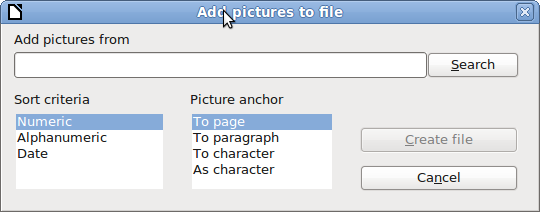
1. Put the image files in the same folder; 2. install AddPics extension; 3. restart LibreOffice; 4. go to Insert menu > Pictures in a new document... OR use the AddPics Toolbar (View > Toolbars > AddPics); 5. in the dialog, click on Search button to select the picture's folder; 6. select the Sort criteria to define the insertion order of pictures (Numeric, Alfanumeric or Data); 7. select the Picture Anchor type; 8. click Create file to create a new document. German translation by Michael Riess. French translation by Sophie Gautier.Homepage: http://wiki.documentfoundation.org/PT-BR/Extensions/Projects/AddPics/en
★ ★ ★ ☆ ☆
Post your review
You cannot post reviews until you have logged in. Login Here.
Reviews
Leonardo Pérez Borges Mar 18, 2022, 5:21 PM (3 years ago)
★ ★ ★ ★ ☆
It works!
But, when the anchor is set to "Page", the images have similar created dates and their names are based on that metadata, I don't get all the images from a folder in the document.
Claude Leduc Oct 14, 2020, 6:43 PM (4 years ago)
☆ ☆ ☆ ☆ ☆
Cette extension ne fonctionne pas dans mon installation (Windows 10 Canada-Français).
Voici le texte de l'erreur dans l'interface anglaise:
BASIC runtime error.
An exception occurred
Type: com.sun.star.container.NoSuchElementException
Message: .
Est-ce mon installation qui est en cause?
Merci.
Guy DENOUAL Jun 28, 2020, 8:17 AM (4 years ago)
★ ★ ★ ★ ☆
- conserver la taille (100%) afin d'éviter les déformations. Il est toujours possible d'ajuster chaque image selon ses besoins. On peut aussi ajouter un choix "100% ; adapter en largeur; adapter en hauteur"
- option : ecrire le nom du fichier sous cahque image. Evolution : choisir le style de caractere (type, taille, gras, italique, ....) ou un style préenregistré (choix dans la liste des styles).
Merci
s v prasanna Jun 21, 2020, 5:58 AM (5 years ago)
★ ★ ★ ★ ★
Thankyou
No one has commented on this page yet.
RSS feed for reviews on this page | RSS feed for all reviews